









One connection
Assessor Validation
A filter-first compliance surface for assessor validation. Every judged assessment outcome (a learner's final grade on a graded activity, judged Competent / Not-yet-competent against the activity's pass threshold, or "No pass threshold") is filterable, and the surface flags assessors whose Competent rate deviates from the same-unit cohort mean. Works with LearnNoow and Moodle.
What is on the assessor validation screen?Captured from the product
The assessor validation screen, as it actually looks
These are screenshots of the real cards, filled with the synthetic dataset the demo runs on. Yours draw from your own LMS.
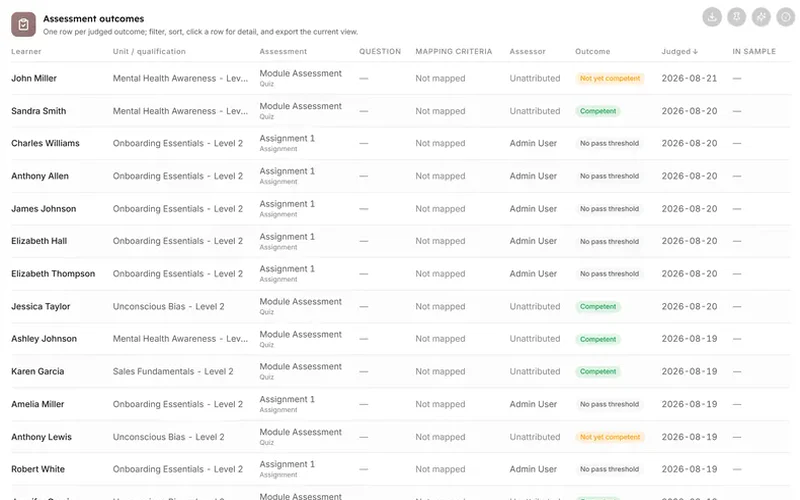
Assessment outcomes
One row per judged outcome (learner, unit, assessment, assessor, outcome, date); switches to question level when a question filter is applied; when a.
Outcomes by assessor
Judged outcomes stacked per assessor (Competent / Not-yet-competent / no-threshold); 100% toggle for comparability; click a bar to filter the table.

In detail
What is on this screen
5 cards, each with an info tooltip that states what it shows and how it is counted. The same explanation appears in the product and in this list.
KPI strip
Assessment outcomes, Competent rate %, Active assessors (with unattributed count), Consistency outliers.
Assessment outcomes / Validation sample
One row per judged outcome (learner, unit, assessment, assessor, outcome, date); switches to question level when a question filter is applied; when a sample is drawn it becomes the "Validation sample" showing only sampled rows.
Outcomes by assessor
Judged outcomes stacked per assessor (Competent / Not-yet-competent / no-threshold); 100% toggle for comparability; click a bar to filter the table to that assessor.
Assessor consistency
Each dot one assessor, judgement volume (x) vs Competent rate (y), dot size = distinct units assessed; dots >15 pp from the same-unit cohort mean flagged amber; <20 judgements muted and excluded; click to filter.
Draw a validation sample
Choose stratification basis (unit / assessor / outcome / month), fixed count or percentage (capped 500 rows), and whether to stratify, then draw.
Questions
How this screen is computed from the product's own documentation.
What does the assessor validation screen show?
A filter-first compliance surface for assessor validation. Every judged assessment outcome (a learner's final grade on a graded activity, judged Competent / Not-yet-competent against the activity's pass threshold, or "No pass threshold") is filterable, and the surface flags assessors whose Competent rate deviates from the same-unit cohort mean. Its payoff is a seeded, deterministic validation sample that becomes part of the audit evidence, supporting the RTO's assessment validation obligations. Defaults: consistency flag threshold 15 pp, minimum 20 judgements to be flagged.
How is kpi strip worked out?
Assessment outcomes, Competent rate %, Active assessors (with unattributed count), Consistency outliers
How is assessment outcomes / validation sample worked out?
One row per judged outcome (learner, unit, assessment, assessor, outcome, date); switches to question level when a question filter is applied; when a sample is drawn it becomes the "Validation sample" showing only sampled rows, each flagged "In sample"
How is outcomes by assessor worked out?
Judged outcomes stacked per assessor (Competent / Not-yet-competent / no-threshold); 100% toggle for comparability; click a bar to filter the table to that assessor
How is assessor consistency worked out?
Each dot one assessor, judgement volume (x) vs Competent rate (y), dot size = distinct units assessed; dots >15 pp from the same-unit cohort mean flagged amber; <20 judgements muted and excluded; click to filter
How is draw a validation sample worked out?
Choose stratification basis (unit / assessor / outcome / month), fixed count or percentage (capped 500 rows), and whether to stratify, then draw
Which plan includes it?
The VET and RTO pack. Business, Scale and Enterprise all include every sector pack. Every card on it carries an Ask AI action and an info tooltip, on every plan that includes the screen.
Which platforms does LearnBoard support?
LearnNoow and Moodle. Connect either one read-only and the same dashboards, charts, alerts and AI answers run on it. LearnNoow has LearnBoard built in; Moodle has one free companion plugin.

See assessor validation on your own LMS
One read-only connection and this screen fills with your figures. Assessor validation is in the VET and RTO pack. Business, Scale and Enterprise all include every sector pack.
Built for LearnNoow and Moodle.
