




The catalogue
Fifty Dashboards, Built.
Yours the Day You Connect.
Every screen flying past is a real capture of the product. One read-only connection to your LMS, and each of them fills with your own numbers instead. Works with LearnNoow and Moodle.
See them filled with real dataCounted, not claimed
Fifty dashboards, nine packs, one read-only connection.
Every figure below is counted from the product, not from a customer survey. Every number here is live in the product today.
- 50 dashboards, already builtBefore you connect anything.
- Every chart embeddableInside your LMS, with nothing boxed in a frame.
- 9 packsFive of them written for one sector each.
- 3 layers stop a writeGrants, validator, connection.
- 0 boxed-in framesThe real components, in your own page.
- 0 sales calls to see a priceEvery number is published.
In detail
Core Analytics: 10 dashboards on every paid plan, five of them on Free.
The ten screens every paid plan opens, five of them on Free too. Between them they answer whether the platform is healthy and who is falling behind.
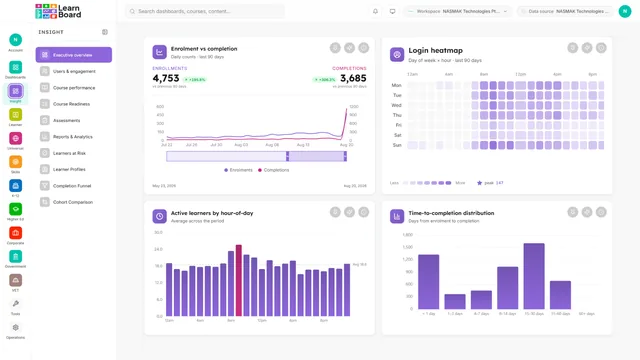
Executive overview Free
Platform health on one screen, for the person who has two minutes.
Users and engagement Free
Who is active, who is dormant, and when people actually log in.
Course performance Free
Every course ranked, so the order is the point.
Course readiness Pro
Whether a course is fit to run, before you run it.
Assessments Free
Quiz and assignment outcomes, with the questions people fail.
Reports and analytics Pro
The reporting workbench: filter, sort, drill and export.
Learners at risk Pro
A risk score against time since last activity, ranked.
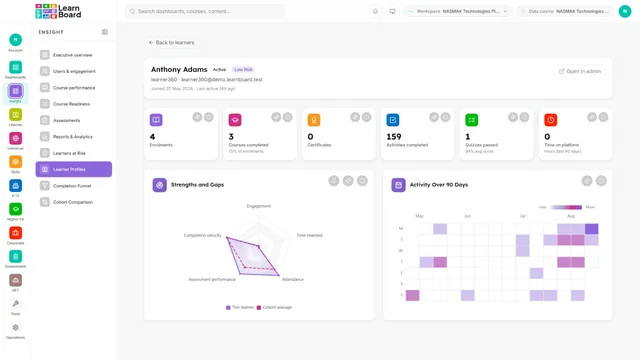
Learner profiles Pro
One learner, every record about them, in one place.
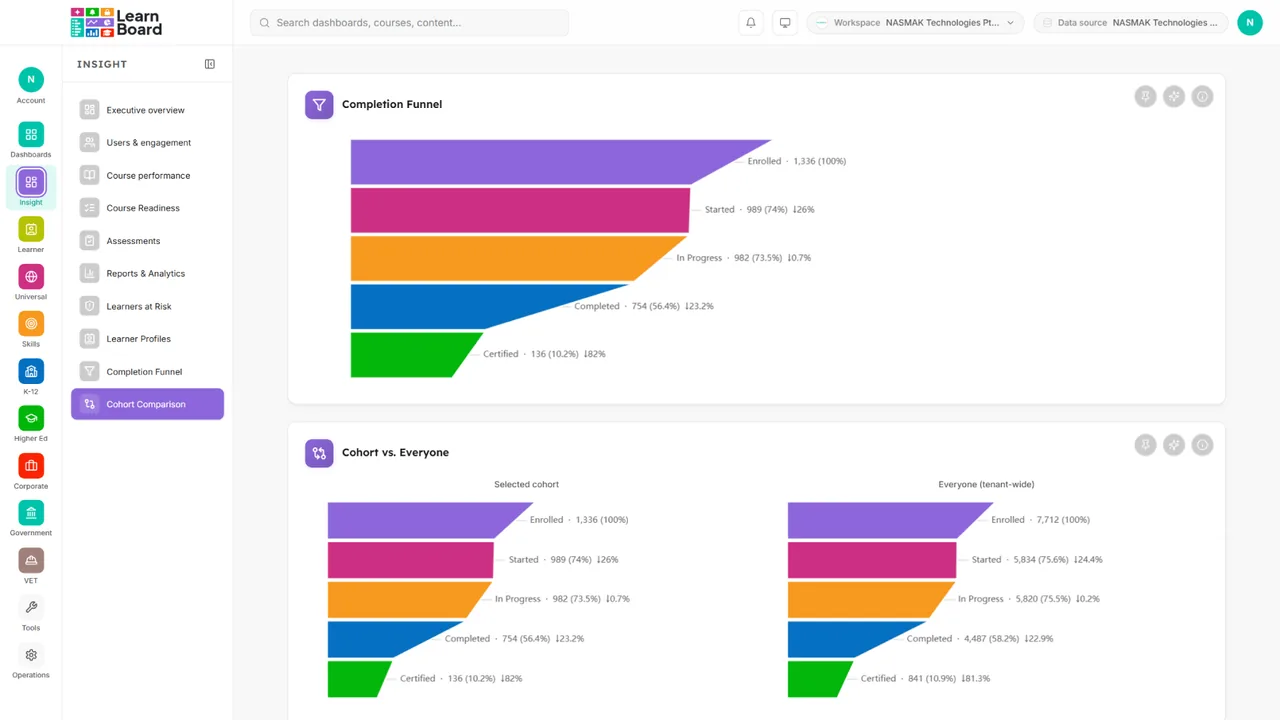
Completion funnel Free
Enrolled through to certified, five stages, and where they leave.
Cohort comparison Pro
This intake against the last one, on the same metrics.
In detail
Insights: 6 dashboards sold from Pro upwards.
Six screens about whether the training is working, and how long it takes. Four on Pro, all six from Business.
Completion and certification trend Pro
Completions and certificates over time, read together.
Course effectiveness scorecard Pro
Every course scored, with the bottom ten as a fix list.
Assessment analytics deep-dive Business
Per question performance, difficulty and distractors.
Time to completion Business
How long it takes, and who the outliers are.
Course feedback Pro
Survey scores, response rates and what learners wrote.
AI-generated insight summary Pro
An AI narrator over the deterministic numbers, weekly.
In detail
Skills and Competency: 5 dashboards sold from Pro upwards.
Five screens about who can do what, what expires when, and what the training returned. Certification expiry on Pro, all five from Business.
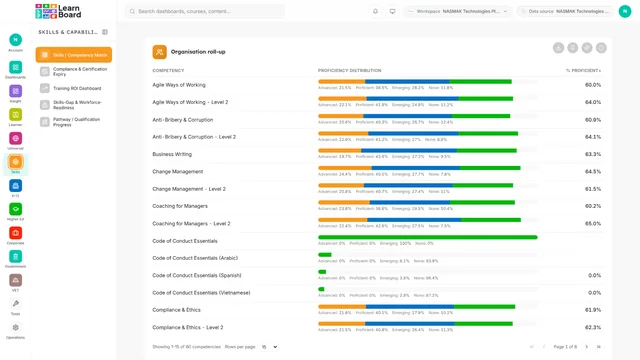
Competency matrix Business
Who holds what, rolled up to the organisation.
Certification expiry Pro
What lapses next, and whose it is.
Training ROI Business
Cost per completion and per certification, against outcomes.
Skills gap and workforce readiness Business
Workforce readiness as a heatmap, and the critical gaps.
Pathway progress Business
Progress along a defined route, not a single course.
In detail
K-12: 4 dashboards sold from Business upwards.
Four screens written for schools: intervention this week, mastery against standards, and what a guardian sees.
ABC early warning Business
Attendance, behaviour and course marks, read as one indicator.
Standards mastery Business
Mastery by standard, and what to reteach first.
Parent and guardian portal Business
Exactly what a guardian sees about their own child.
Behaviour correlation Business
Incidents against academic performance, over time.
In detail
Higher Education: 6 dashboards sold from Business upwards.
Six screens for registrars and program leads: will this cohort graduate, where did they come from, and does the curriculum hold up.
Progression forecasting Business
Where a cohort lands if nothing changes.
Enrolment funnel Business
Which source brings people who finish, not just people who enrol.
Program effectiveness Business
Programs compared on completion against achievement.
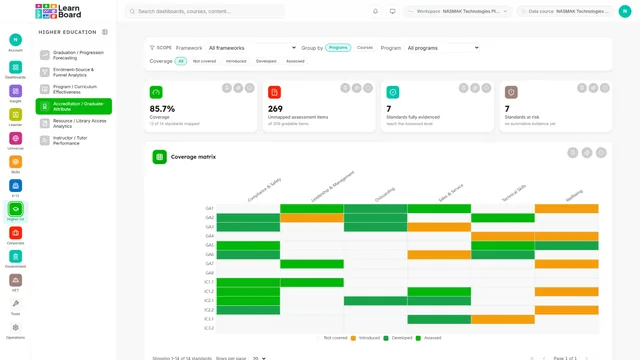
Accreditation mapping Business
Graduate attributes against coverage, and the gaps.
Library access Business
Which resources are used, and when.
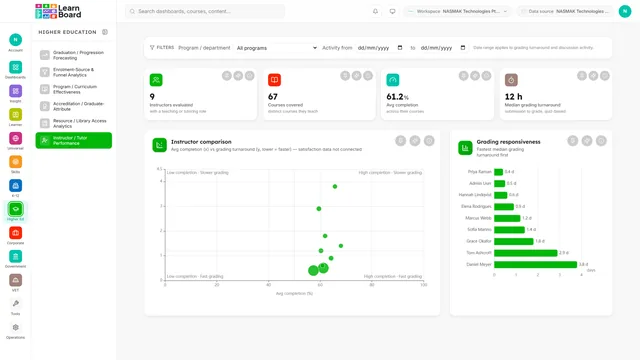
Instructor performance Business
Grading responsiveness and outcomes, by instructor.
In detail
Corporate L and D: 5 dashboards sold from Business upwards.
Five screens for a training function that reports upwards: ramp, compliance, satisfaction, spend and the path people take.
Onboarding ramp Business
How long a new starter takes to become productive.
Mandatory compliance Business
Who is overdue, by department, right now.
Training satisfaction Business
Satisfaction over time, and where it comes from.
Budget utilisation Business
What the training cost, per learner, against budget.
Learning-path flow Business
The route people take, and the stage they leave at.
In detail
Government: 4 dashboards sold from Business upwards.
Four screens about obligation and access: capability against succession, accommodations, language, and the regulatory audit.
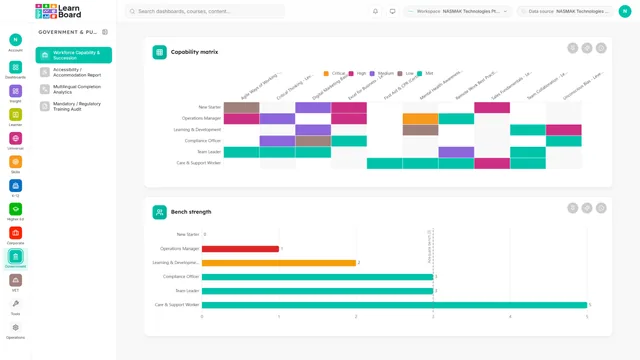
Workforce capability Business
Capability against succession risk and bench strength.
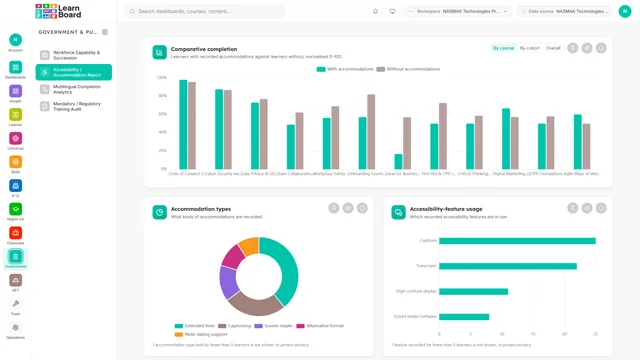
Accessibility and accommodations Business
Whether learners with accommodations complete at the same rate.
Multilingual completion Business
Completion by language, and translation effectiveness.
Regulatory training audit Business
The audit table, with its method stated on the page.
In detail
VET and RTO: 5 dashboards sold from Business upwards.
Five screens built so competency outcomes and AVETMISS reporting are defensible to a regulator rather than reconstructed for one.
Unit-of-competency outcomes Business
Unit outcomes by learner, weakest first.
AVETMISS equity Business
Completion by demographic, and the intersectional view.
TVA readiness Business
Whether the submission would pass before you send it.
Apprenticeship and on-job training Business
On-job hours against nominal, with sign-off status.
Assessor validation Business
Outcomes by assessor, and a validation sample to draw.
In detail
Platform: 5 dashboards included on every paid plan.
Five screens on every paid plan, three of them on Free: the product's own machinery, working from the day you connect.
Compliance and certificates Pro
Certificates issued, compliance by cohort, and what expires.
AI assistant Every plan
Ask in English. A safe, read-only lookup comes back as an answer.
Alerts Pro
Thresholds on risk, readiness and KPIs, evaluated on a schedule.
Personal dashboards Every plan
Pin any card onto a board of your own, redrawn live.
My Learning Every plan
The learner's own record, and only their own.
Three of the fifty, drawn on real LMS data
Core Analytics
Executive overview: the platform on one screen
Active learners, a composite health score, enrolments against completions and a login heatmap. It is the screen for the person who has two minutes, and it is on the free plan.

VET and RTO
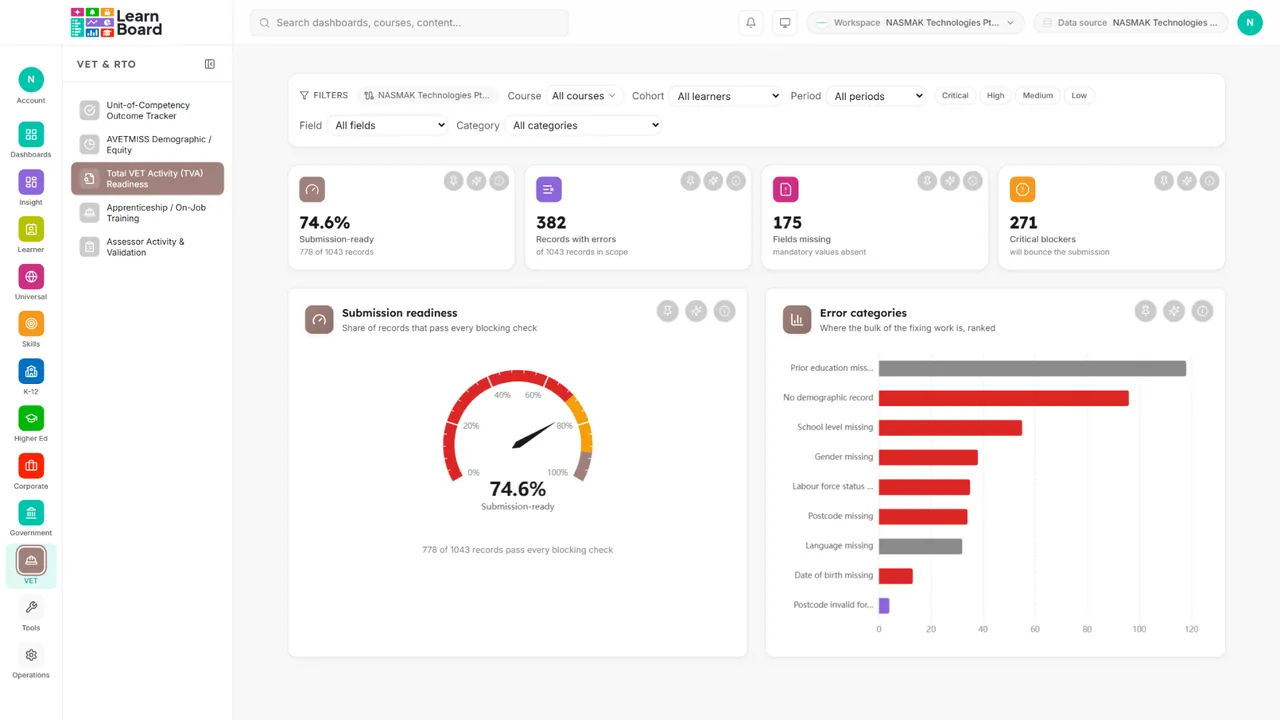
TVA readiness: would the submission pass
Field completeness, an error worklist and a submission readiness gauge, so the errors are found before the regulator finds them rather than after.
Corporate L and D
Budget utilisation: what the training cost
Spend against budget by quarter, a cost breakdown and a cost per learner. The rates behind it are set in the admin console, so the figures are yours rather than assumed.

Questions
Questions about the catalogue and what comes with which plan.
How many dashboards does LearnBoard have?
Fifty, across nine packs. The count is read from the pack configuration the application itself uses to decide what exists and who may see it, not from a marketing sheet. Eight are on the free plan, twenty on Pro, and all fifty on Enterprise.
Which dashboards are free?
Executive overview, users and engagement, course performance, assessments and the completion funnel, plus the AI assistant, personal dashboards and My Learning. Eight of the fifty, on the free plan, permanently.
Do we have to build any of them?
No. All fifty exist before you connect anything and fill with your own numbers when you do. You can additionally build boards of your own by pinning cards onto them.
Do competitors publish a list like this?
Not one of the five we track. Edwiser Reports PRO lists nine reports, which is its whole product. IntelliBoard, Zoola, LearnerScript and Instructure describe capability and never enumerate it.
Can we buy one screen out of a pack we do not have?
Yes. Plans can include or exclude individual surfaces, so a plan that sells one screen out of an otherwise locked pack opens exactly that screen.
What is on every card?
A title, an explanatory subtitle, an info tooltip stating what the card shows and how it is computed, an Ask AI action scoped to that card, pin-to-dashboard where the card is a registered widget kind, and CSV export where the card has a CSV export.
Which platforms does LearnBoard support?
LearnNoow and Moodle. Connect either one read-only and the same dashboards, charts, alerts and AI answers run on it. LearnNoow has LearnBoard built in; Moodle has one free companion plugin.
Keep reading
The rest of the product, in the same amount of detail.
Charts
Inside your LMS
AI
Pricing

Fifty dashboards, filled with your own numbers
One read-only connection and the Core dashboards populate in the same session. Business open for 14 days, no card.
Built for LearnNoow and Moodle.