It is the chart, not a picture
The pin records which chart it is, so it stays live.
What you get
How you use it
Side by side

K-12 schools
Higher education
Corporate L&D
Government
Training providers
Evaluates everyone holding a teaching or tutoring role on the connection, teaching load, course completion, grading turnaround and (where available) satisfaction and forum responsiveness, with a comparison scatter, responsiveness ranking and full scorecard. Degrade-able metrics (satisfaction, forum responsiveness) state exactly why they are unavailable rather than showing a zero, and the scatter's vertical axis adapts to whichever data is connected. Works with LearnNoow and Moodle.
Start freeInstant demo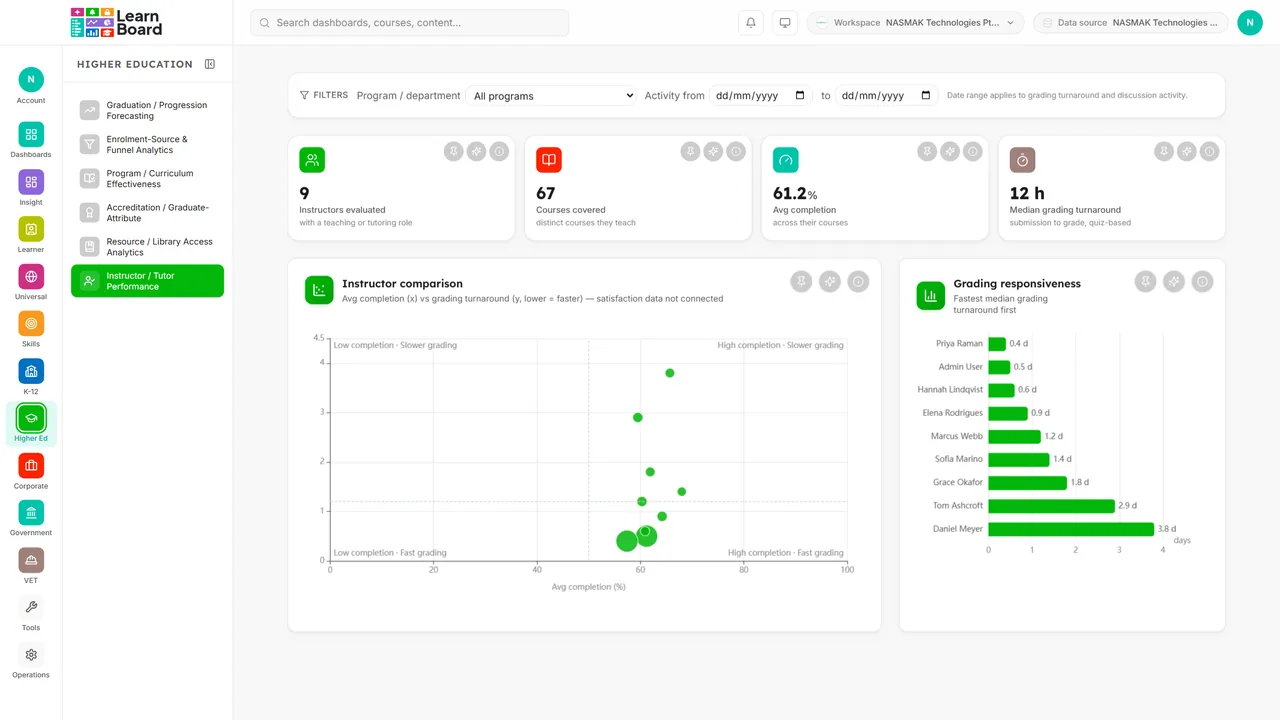
It is the chart, not a picture
The pin records which chart it is, so it stays live.
Everyone gets their own
Compliance and finance are not stuck sharing a screen.
Share it three ways
With a person, with a role, or with the whole organisation.
Captured from the product
These are screenshots of the real cards, filled with the synthetic dataset the demo runs on. Yours draw from your own LMS.
One dot per instructor: avg completion (x) vs satisfaction OR grading turnaround (y), dot size = learners taught.

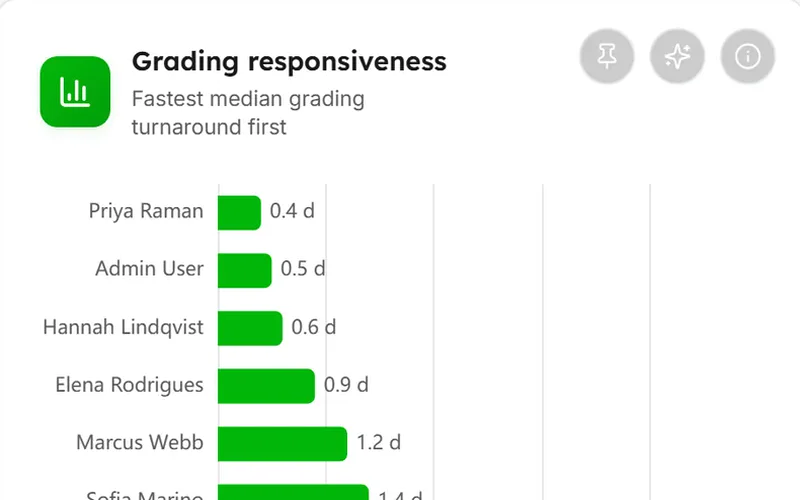
Instructors ranked by median grading turnaround, fastest first.
In detail
4 cards, each with an info tooltip that states what it shows and how it is counted. The same explanation appears in the product and in this list.
Scope-level teaching headlines (all from robust, always-available signals).
One dot per instructor: avg completion (x) vs satisfaction OR grading turnaround (y), dot size = learners taught.
Instructors ranked by median grading turnaround, fastest first.
Every instructor: teaching load, completion, satisfaction, forum responsiveness, grading turnaround; row to per-course drawer.
Questions
Evaluates everyone holding a teaching or tutoring role on the connection, teaching load, course completion, grading turnaround and (where available) satisfaction and forum responsiveness, with a comparison scatter, responsiveness ranking and full scorecard. Degrade-able metrics (satisfaction, forum responsiveness) state exactly why they are unavailable rather than showing a zero, and the scatter's vertical axis adapts to whichever data is connected.
Scope-level teaching headlines (all from robust, always-available signals)
One dot per instructor: avg completion (x) vs satisfaction OR grading turnaround (y), dot size = learners taught
Instructors ranked by median grading turnaround, fastest first
Every instructor: teaching load, completion, satisfaction, forum responsiveness, grading turnaround; row to per-course drawer
The Higher education pack. Business, Scale and Enterprise all include every sector pack. Every card on it carries an Ask AI action and an info tooltip, on every plan that includes the screen.
LearnNoow and Moodle. Connect either one read-only and the same dashboards, charts, alerts and AI answers run on it. LearnNoow has LearnBoard built in; Moodle has one free companion plugin.
One read-only connection and this screen fills with your figures. Instructor performance is in the Higher education pack. Business, Scale and Enterprise all include every sector pack.
Built for LearnNoow and Moodle.