Step one
Built in
LearnBoard,
Built Into LearnNoow.
LearnBoard is part of LearnNoow. Dashboards, every chart and the AI assistant switch on with your workspace, on the data you already hold, with the sign-in you already use. Works with LearnNoow and Moodle.
Open the live demo or Start free

What is already there
The connection
switched onLearnBoard is built into your LearnNoow workspace and brings in every chart and dashboard from your own LearnNoow data. Nothing sensitive ever reaches a browser or a student.
Built into your workspace
See it liveCharts on your pages
every pagePut any LearnBoard dashboard or card on a LearnNoow course or home page instantly: the real chart, scoped to that course, on your own theme.
On any LearnNoow page, instantly
Browse the dashboardsOne sign-in
your rolesWhoever is signed in to LearnNoow is signed in to LearnBoard, with the same roles. No second password and no second user list to keep in step.
Administrator, teacher and learner views, automatically
How access worksAsk AI and alerts
on every cardEvery card carries an Ask AI button, and a threshold on risk or readiness fires the moment it is crossed. Credits and alerts come with your plan and show as you use them.
Explained in plain language, against your own figures
See the AI assistant
On LearnNoow it is already built in. Running Moodle as well? One free plugin does the same job: the Moodle plugin.
What being built in means day to day
Same data, no sync
Your numbers, read in place
Learners, courses, completions and grades are read straight from LearnNoow. Nothing is exported, nothing is copied to a second system, and nothing waits for an overnight job. When a completion lands in LearnNoow, it is on the dashboard.

On the page they already open
The real chart, where the teacher is
A course page can carry the at-risk list for that course, a home page the activity trend, a department page the compliance gauge. Each one is the living chart from LearnBoard, scoped to the page, on your theme, not a picture and not a frame.

Ask on every card
The AI assistant, inside LearnNoow
Every chart carries an Ask AI button. A teacher clicks it and gets the chart explained in plain language, against their own figures, without leaving the page. Credits come with your plan and are shown as you use them.

Getting started
Three steps on LearnNoow
The whole setup on LearnNoow, in the order you do it. Nobody needs a developer, an administrator or a change window.
Step two
Pick a dashboard, or pin a card to a page
Step three
Read your own numbers, the same day
By role
What each person sees, the moment they sign in
The roles you hold in LearnNoow carry over. Pick a role to see what is waiting for them.
Every workspace, every plan line, one screen
Built for the person who runs LearnNoow.
- Executive overviewActive learners, completions, at-risk counts and health score, live.
- Users and engagementWho is active, who has gone quiet, and when your learners really work.
- AlertsA line on risk or readiness, and a notification the moment it is crossed.
- Billing and quotasPlan, credits, connections and seats, with usage against every limit.
Their courses, their learners, on their page
Built for the teacher who has ten minutes between classes.
- Learners at riskThe composite risk score for their course, ranked, before the term is lost.
- Course performanceCompletion, grades and time on task, course by course.
- AssessmentsWhich questions everyone gets wrong, and which learners are stuck.
- Ask AIAny chart explained in plain language, against their own class.
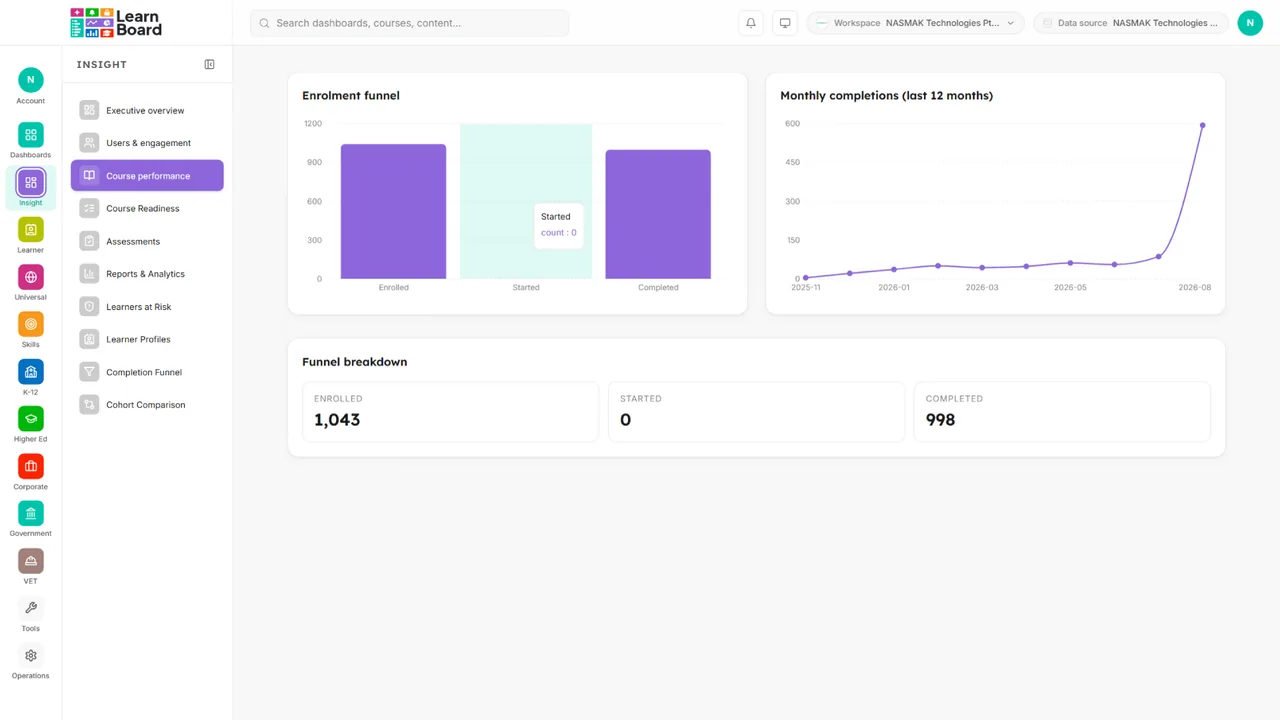
The board pack, without the spreadsheet
Built for the sponsor who signs off the training budget.
- Completion funnelWhere learners drop between enrolment and certificate.
- Cohort comparisonDepartments, intakes and sites side by side.
- Training ROICost per completion and cost per certification from the rates you set.
- Reports and analyticsEvery figure exportable, every export traceable.
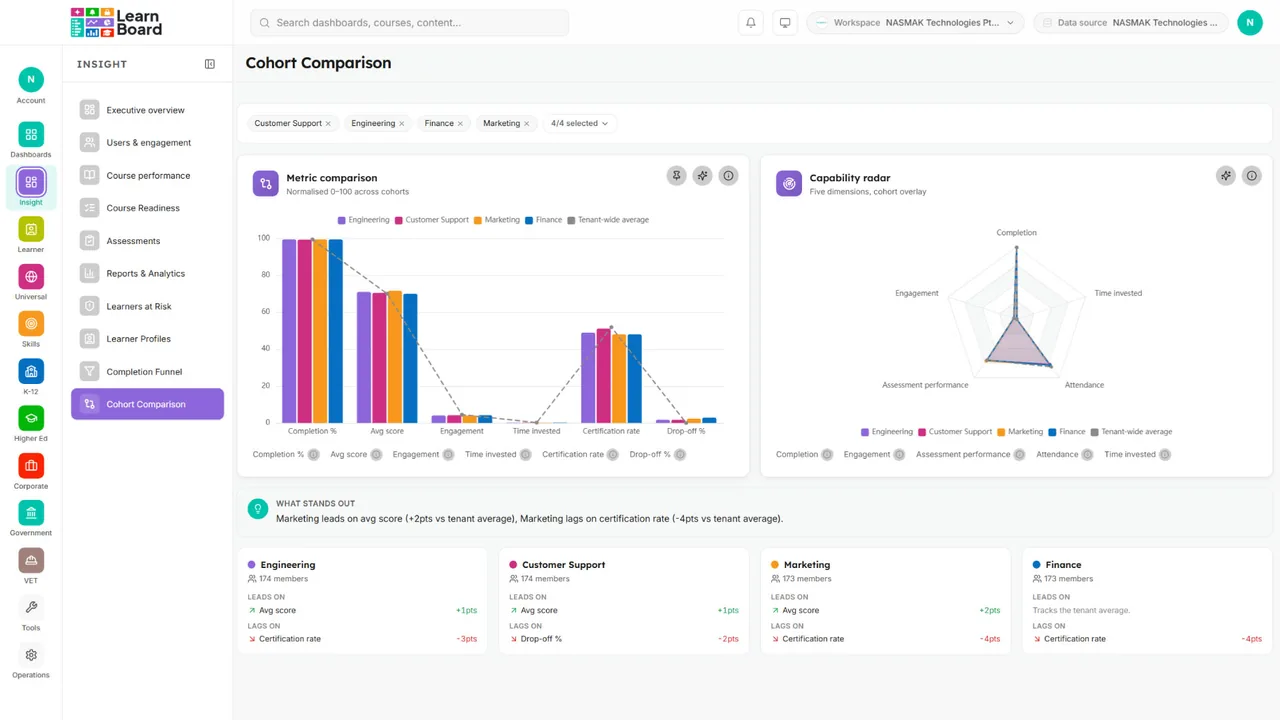
What a page can carry
Six cards that can sit on a LearnNoow page
Any card from any dashboard can go on a LearnNoow page, scoped to the course the page is about. These six are the ones people place first.
Risk levels by group
From the learners at risk screen, on the synthetic demo dataset.

Budget gauge
From the budget utilisation screen: spend against the allocated budget.

Capability matrix
From the workforce capability screen: every role against every capability.

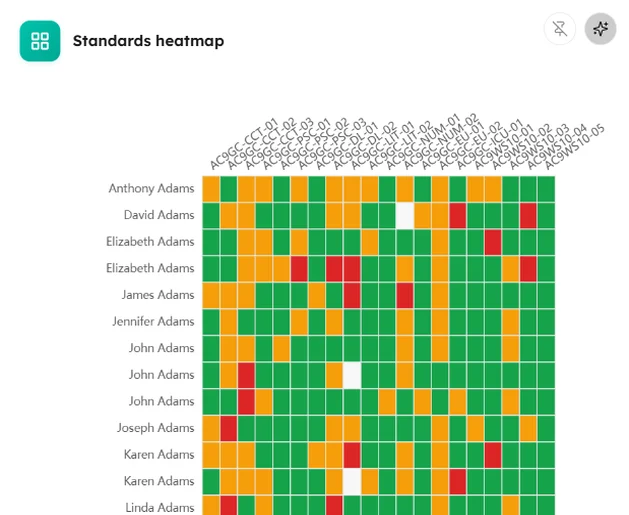
Standards heatmap
From the standards mastery screen: every learner against every standard.
Login heatmap
From the users and engagement screen: when people actually sign in.

Certificate issuance
From the certification expiry screen: what was issued, and when.

One platform
Two parts, already joined
LearnBoard is built into LearnNoow, so there is nothing to keep in step. LearnBoard reads LearnNoow the way LearnNoow reads itself.

Already connected
Your LearnNoow data is the source from the first minute. Nothing to migrate, nothing to paste.
Drawn for you
Fifty dashboards and every chart kind, filled with your own numbers on day one.
Where they already look
On a board of their own, or on the LearnNoow page they open every morning.
Questions
Questions about LearnBoard on LearnNoow and what comes built in.
Do I need to install anything on LearnNoow?
No. LearnBoard is built into your LearnNoow workspace and brings in every chart and dashboard from your own data, and your people sign in with the LearnNoow account they already have.
Is LearnBoard included with LearnNoow?
Every LearnNoow workspace can switch LearnBoard on, starting on the Free plan with eight dashboards that never expire. The plan you choose sets how many dashboards and how many AI credits you have; every price is published on the pricing page.
Can I put a chart on a LearnNoow course page?
Yes. Put any LearnBoard dashboard or card on a LearnNoow course or home page instantly. It is the real, living chart, scoped to that course, on your own theme, and it updates as your data does.
Does it slow LearnNoow down?
No. LearnBoard reads your LearnNoow data and prepares the numbers ahead of time, so a dashboard opens from figures that are already computed rather than querying your live tables while a class is in session.
Who can see what?
The roles you already hold in LearnNoow carry over. An administrator sees everything, a teacher sees their courses and learners, and a learner sees only their own progress. Nothing needs setting up twice.
We also run Moodle. Does the same thing work there?
Yes. For Moodle, one free plugin does what LearnNoow has built in: your administrator installs it once, and teachers drop the LearnBoard block onto a page. Same dashboards, same charts, same AI assistant.
Keep reading
What is on the dashboards, and what it costs to have them.
Dashboards
Moodle
AI
Pricing

Already on LearnNoow? Then you are already connected.
Open LearnBoard from your menu and the first dashboard is waiting, filled with your own numbers. Free to start, no card.
Built for LearnNoow and Moodle.