

The data connector
The data connector is how LearnBoard reads your Moodle site’s reporting data. LearnBoard asks, the plugin checks the question on your own server, runs it read-only, and answers with rows. It is for the Moodle administrator, and for anyone who has to approve how LearnBoard touches the Moodle database.
At a glance
Section titled “At a glance”- LearnBoard sends signed queries to
https://your-moodle/blocks/learnboard/query.php, the HTTPS address your site already serves. - Your database never accepts a connection from outside the server. It can stay bound to localhost, with no port opened.
- Read only. Every statement is checked on your server first, and runs on a database session set to read-only.
- Only the reporting tables LearnBoard uses can be read. Passwords, tokens, keys and site configuration are refused.
- Every request is written to an audit log in your Moodle data folder.
- Needs MySQL or MariaDB.
How LearnBoard reads your site
Section titled “How LearnBoard reads your site”-
In LearnBoard, your workspace has a data source of type Moodle plugin with your Moodle’s address. The connection code creates it for you when you save it in Moodle.
-
When a LearnBoard screen or a chart in Moodle needs figures, LearnBoard sends a request to your site’s
query.php, signed with the connector key. -
The plugin checks the request, then checks each statement in it, and runs the ones that pass on a read-only database session.
-
The plugin sends the rows back, signed, so LearnBoard knows the answer belongs to the request it sent.
-
LearnBoard keeps each figure for a while instead of asking your Moodle on every page view. Last updated and Refresh on each dashboard show and reset that.
What is checked, in order
Section titled “What is checked, in order”Cheapest checks first, so a bad request costs your server almost nothing:
- The request came over HTTPS.
- It is a POST, and not larger than 2 MB.
- It carries a timestamp, a one-time number (nonce) and a signature in the right shape.
- The timestamp is within 5 minutes of your server’s clock.
- Allow LearnBoard to read data through the plugin is on, and a full-length connector key is set.
- If LearnBoard server addresses is filled in, the request comes from one of them.
- The signature matches, made with your connector key.
- The nonce has not been seen in the last 10 minutes, so a captured request cannot be sent again.
- There is a free slot under Requests to answer at once. If not, LearnBoard is told to come back in 2 seconds and asks again.
Only then is a database connection opened for the queries.
What it will and will not run
Section titled “What it will and will not run”Every statement is checked by the plugin on your site’s terms, not LearnBoard’s:
- Reads only. A statement must start with SELECT or WITH. No write, no schema change, no lock, no delay, no file access, no session change.
- This site’s reporting tables only. Every table named must be on the plugin’s allowlist of the tables LearnBoard’s screens use. No other database on the server, no
mysql, noperformance_schema. A FROM or JOIN the check cannot read completely is refused. - No secrets. Password, token, key and secret columns are refused by name, column renaming cannot get round that, and
SELECT *is refused. Password, token and key columns are also dropped from results. - One statement at a time, with bound values, and at most 50 statements per request.
The database session is set to read-only before anything runs, with a 60 second limit per statement. If you fill in Read-only database user, the statements run on that SELECT-only account instead of Moodle’s, so a write is impossible at the database level too.
The audit log
Section titled “The audit log”Every request is written to {dataroot}/block_learnboard/query-audit.log: the caller’s address, what was asked (a connection test or queries), the answer status, how long it took and how big the answer was. For each statement the log keeps a short fingerprint of the SQL, whether it ran, was refused or failed, and how many rows it returned.
Settings that shape it
Section titled “Settings that shape it”| Setting | Use it to |
|---|---|
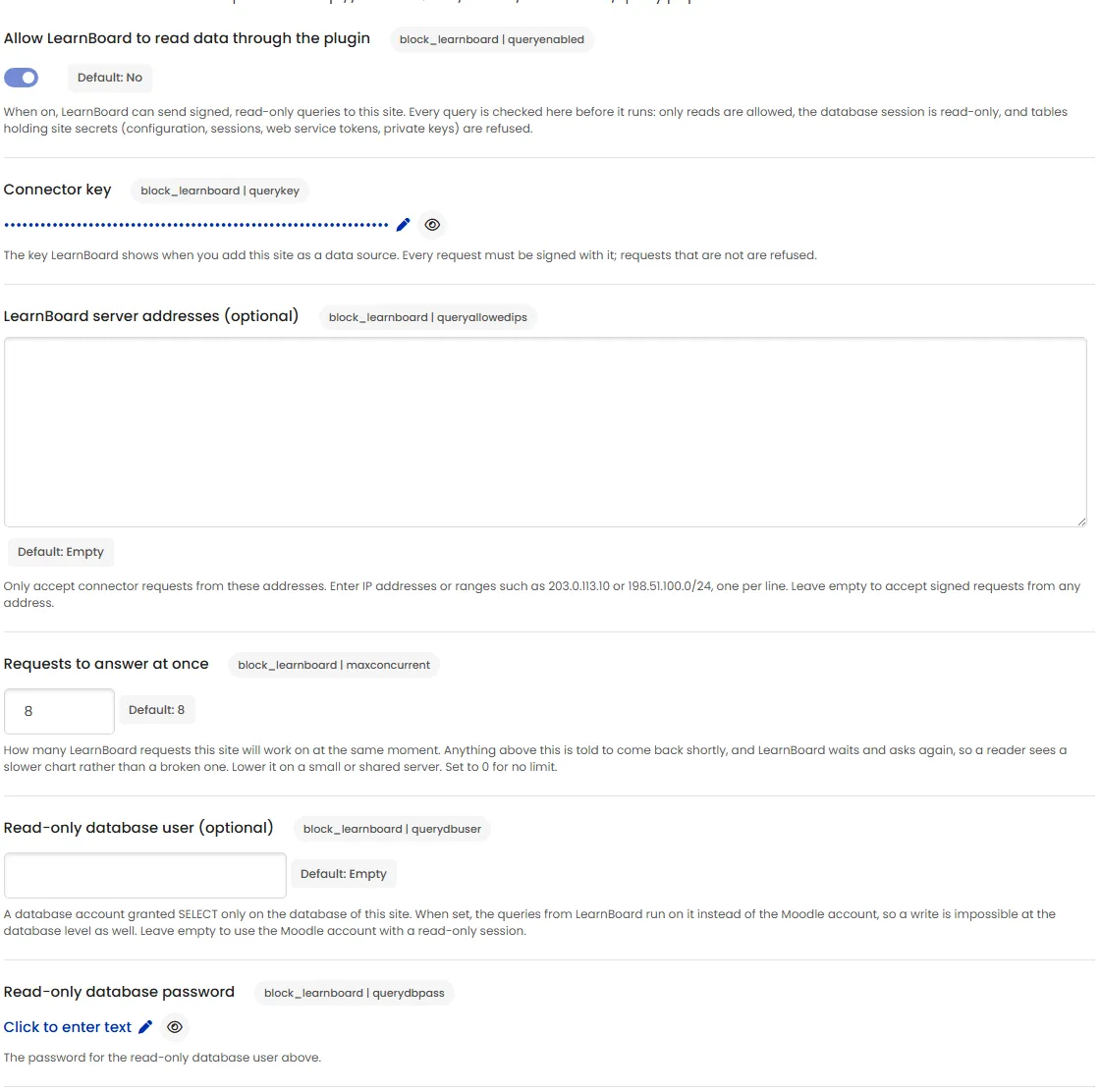
| Allow LearnBoard to read data through the plugin | Switch the connector on or off. Off, query.php answers nothing. |
| Connector key | Hold the shared key. Filled in by the connection code. |
| LearnBoard server addresses (optional) | Accept requests only from LearnBoard’s own IP addresses. |
| Requests to answer at once | Limit how many LearnBoard requests run at the same moment. Default 8. Lower it on a small or shared server; 0 means no limit. |
| Read-only database user (optional) and password | Run LearnBoard’s queries on a SELECT-only database account. |
Answers you may see in LearnBoard
Section titled “Answers you may see in LearnBoard”When LearnBoard tests or uses the connector, the plugin answers with a short reason if it refuses:
| Answer | Meaning |
|---|---|
https_required |
The request did not come over HTTPS. |
connector_disabled |
The connector is switched off, or no connector key is set. |
address_not_allowed |
The request came from an address not in LearnBoard server addresses. |
unauthenticated or stale_request |
The signature did not match, or the clock difference is over 5 minutes. Make a new connection code and paste it, and check the server clock. |
busy |
All slots under Requests to answer at once are taken. LearnBoard retries. |
unsupported_database |
The site is not on MySQL or MariaDB. |
refused |
A statement failed the checks above. |