

Audit log
The Audit log records who did what in your workspace: every report, AI and admin event, with the person, the time and the address it came from. Use it to answer questions such as who changed a role, who deactivated an account, or what the AI was asked.
At a glance
- Who can open it: the Admin role, with View audit log (
view.admin.audit-log). - Where: Admin console, Audit log, at
/admin/audit-log. - Needs a plan that includes the audit log. Events are recorded on every plan; the plan only decides whether you can read them back here.
- You see your own workspace’s events only. Actions by LearnBoard’s own staff are left out.
- Opening the log is itself recorded.
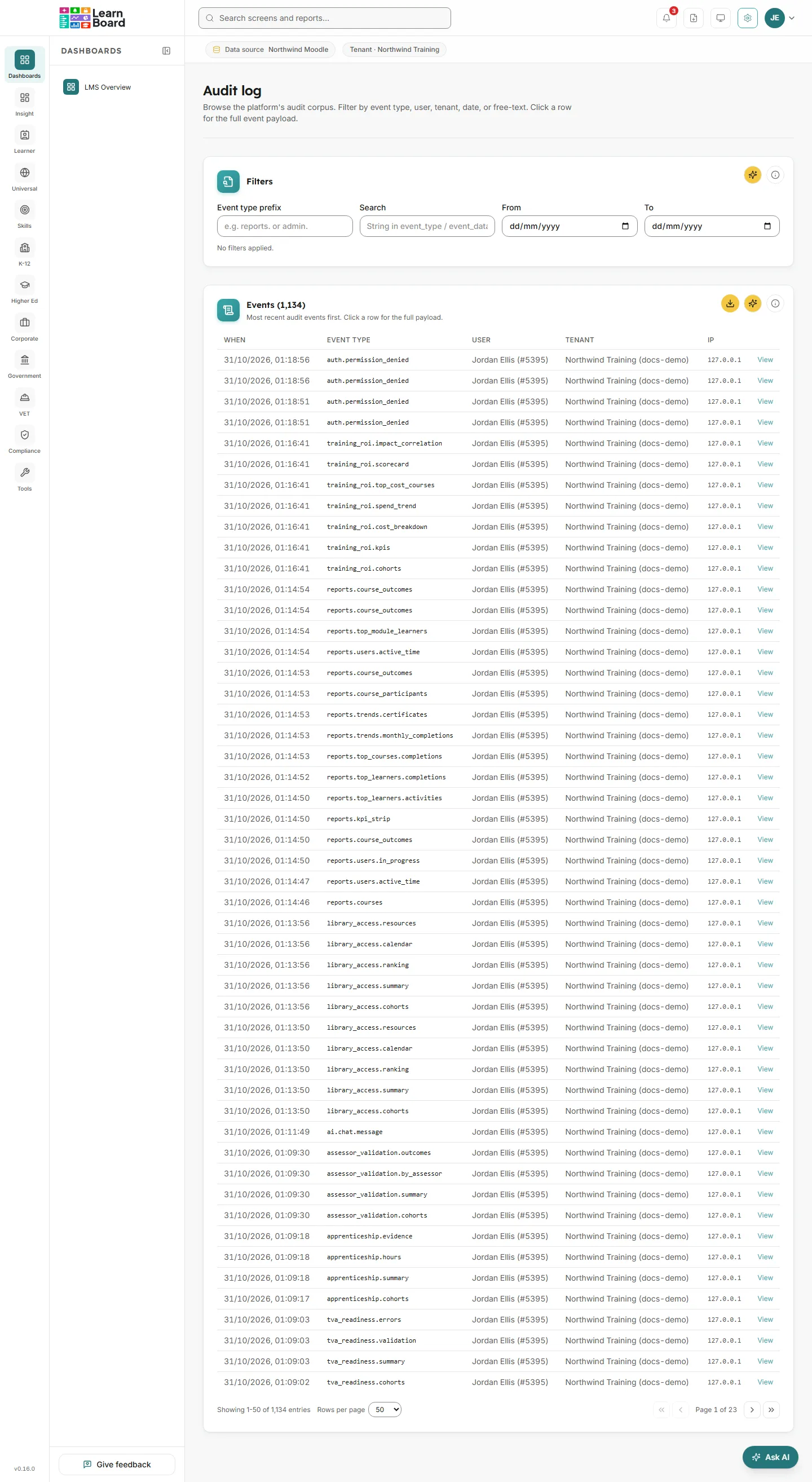
Filters
Section titled “Filters”Narrow the events shown below.
| Filter | What it matches |
|---|---|
| Event type prefix | The start of an event type, for example reports., ai. or admin.. |
| Search | Any text in the event type, the event’s details or the IP address. |
| From | Events on or after this date. |
| To | Events on or before this date. |
Each active filter shows as a pill. Clear all removes them.
Events
Section titled “Events”The filtered events, newest first, with the total in the card title.
- How to read it: When the event happened, its Event type, the User who did it (name and number), the Tenant (your workspace) and the IP address.
- What you can do: click a row, or press View, to open the full event detail, including everything recorded with it. Download the rows as CSV with the card’s download button. Page through the entries at the foot.
What do the event types mean?
Section titled “What do the event types mean?”Event types are grouped by their first word:
reports.events are reads of Reports & Analytics and its CSV downloads, with the filters used and how many rows came back.ai.events are AI assistant use, such as chat messages and generated insights.admin.events are administration, for exampleadmin.users.role_assign,admin.tenant_reporting_config.update,admin.groupings.definition_created,admin.scheduled_report.create,admin.training_costs.config.update,admin.billing.addons_updatedandadmin.audit_log.view.
- To see every change made by administrators, enter
admin.in Event type prefix. - To find events about one person, enter their name or email in Search.
- Set From and To to a date range.
- Click a row to see exactly what was recorded.
Related
Section titled “Related”AI transparencyAI questions, data read and ratings.
Users and invitationsThe changes most often looked up here.
Your subscriptionPlans that include the audit log.